Off campus access to Access Manager will require occasional sign-in with multi-factor authentication (MFA). It will prompt for this at least once/week, and more frequently if you use multiple computers or private browsing sessions.
Browse to https://access.ccsdetroit.edu and sign in with your normal credentials (just the first part of your email address before the ‘@’). Once past the initial login, you’ll see a prompt that looks like this:
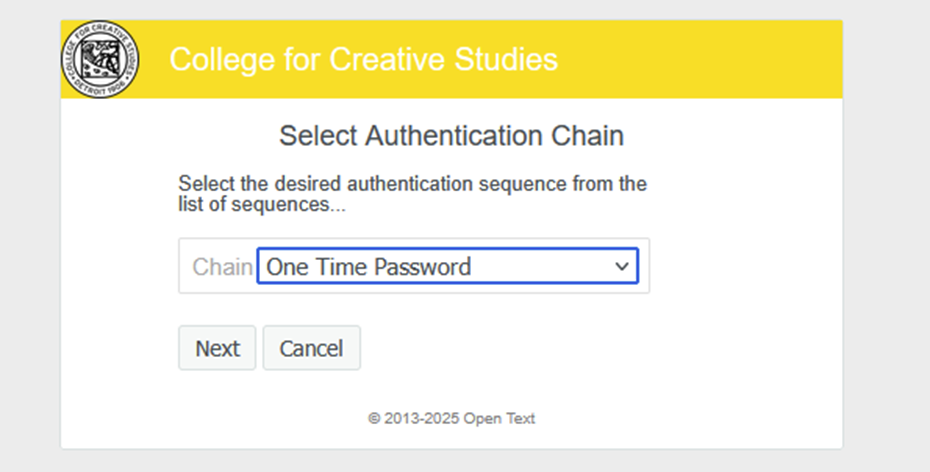
If you have more than one authentication type set up, you can pull down the box to choose the one you want (authenticator app, email, or sms/text — the exact names will vary based on any display names you entered when setting up your MFA).
After picking a chain (if applicable), and clicking next, you’ll see this:
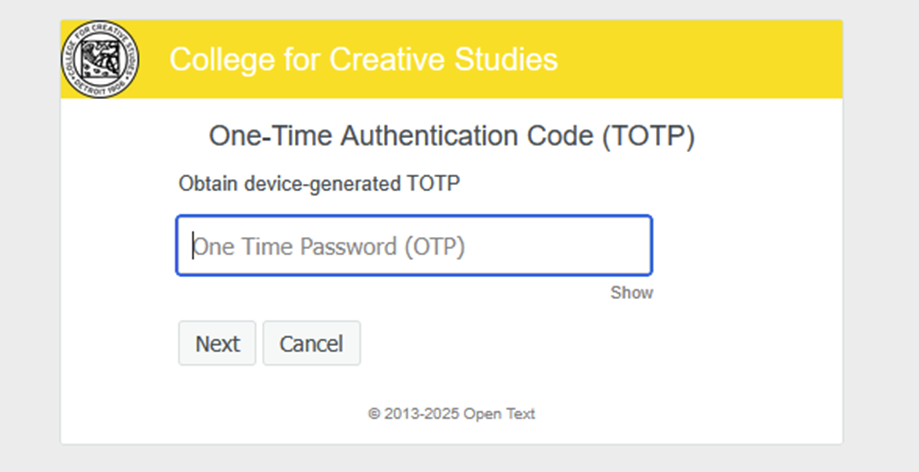
Enter the six digit code you receive from your authenticator app, via text, or via email and you’re set! If using an authenticator app, if you’re near the expiration time of a code (within a few seconds), it’s best to wait for the next code to be generated.
If you haven’t yet set up your authentication methods, or want to edit or add a method, you can do so following the instructions here: https://campus.collegeforcreativestudies.edu/its/multi-factor-sign-in/