Beginning in Fall 2026, the Business Office is launching a new credit card reporting system and transitioning our company cards to VISA. This upgrade is designed to make tracking expenses faster,easier and completely mobile-friendly.
Once you receive the application link, please complete the required fields to request your updated commercial card.
Step 1: General Information
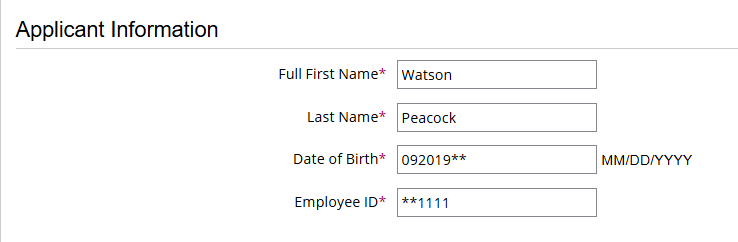
Please enter your full legal name (first and last), your date of birth, and your CCS Employee ID.
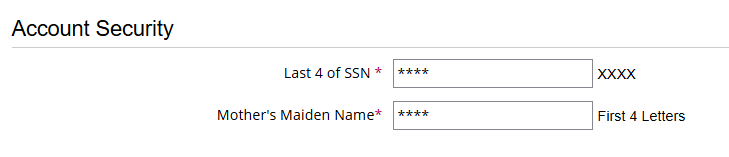
Enter the last four digits of your SSN, followed by the first four letters of your mother’s maiden name.
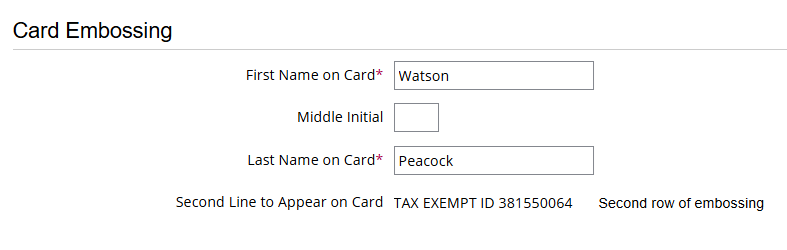
Please enter your first and last name (and middle initial, if applicable) as you would like it to appear on Line 1. Line 2 will automatically display the College’s tax-exempt ID.
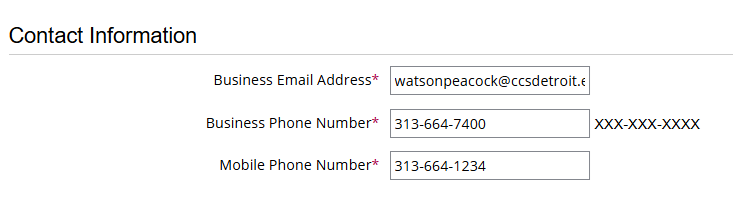
Enter your business email address and mobile phone number. Please ensure you provide a mobile number, as it will be used for fraud protection alerts.
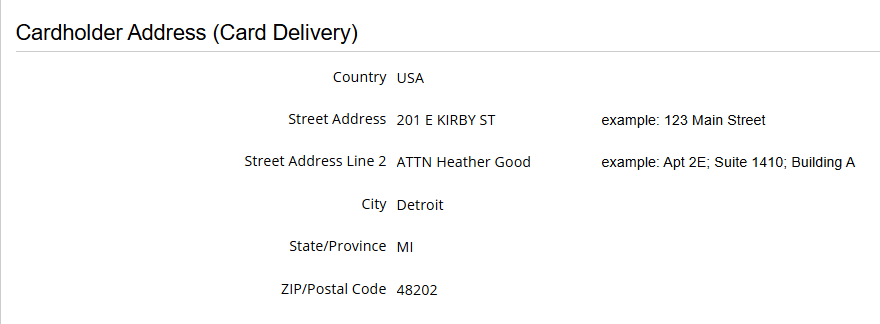
Cards will arrive at the Business Office within 3 to 5 business days. Once your card is here, we will contact you to arrange pickup.
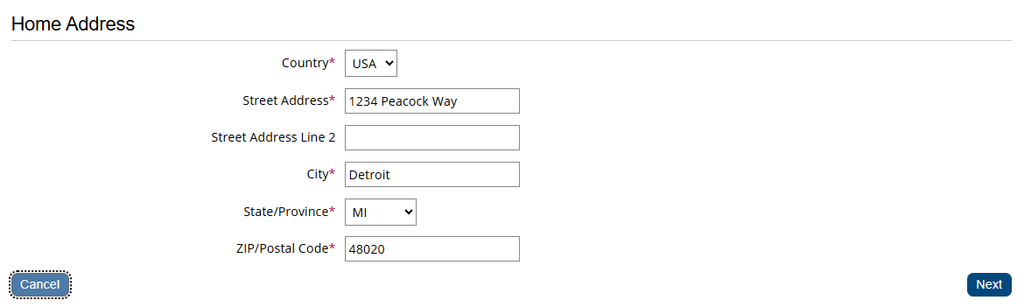
Please enter your home address in the final section. Once complete, click Next in the bottom-right corner of the form.
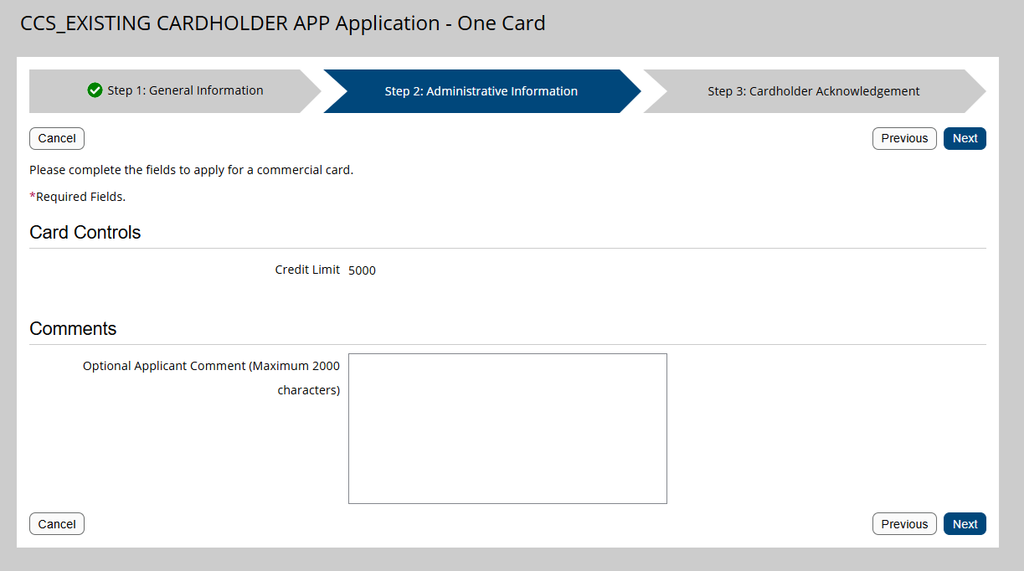
Step 2: Administrative Information
Step 3: Cardholder Acknowledgement
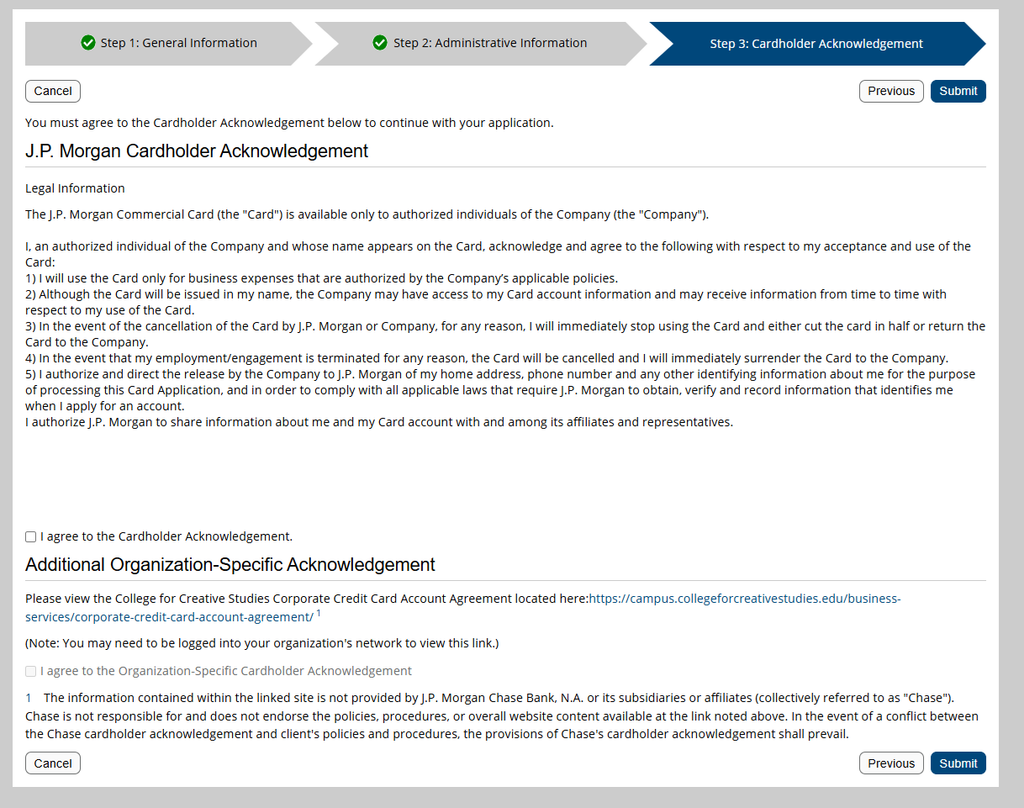
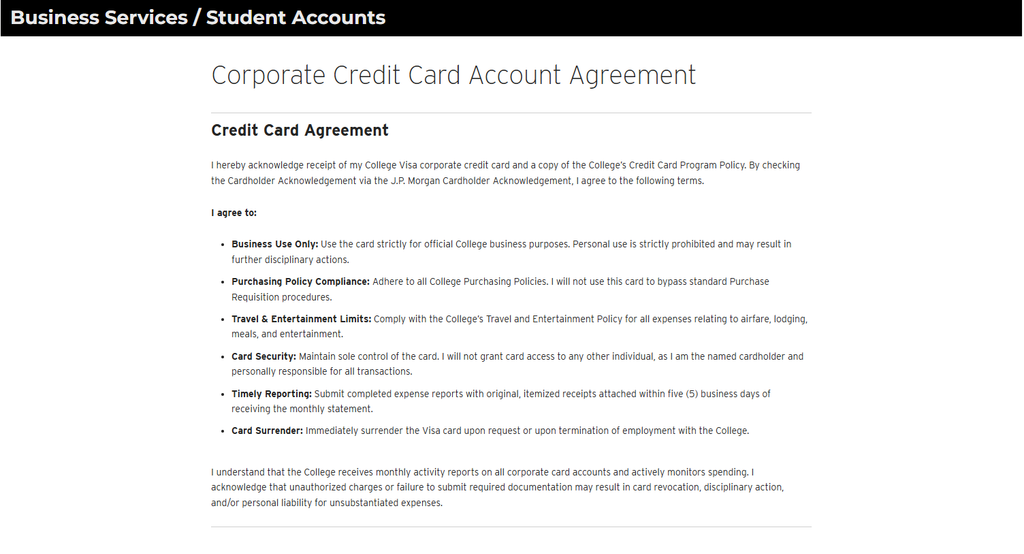
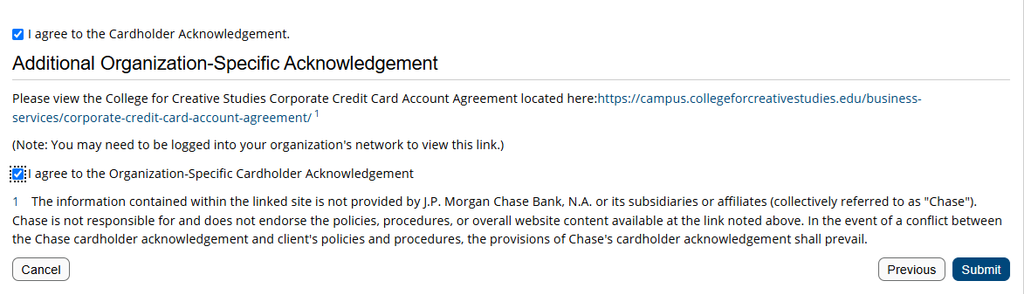
Please agree to both acknowledgement sections on this screen. Note that the Additional Organization-Specific Acknowledgement will be greyed out at first. You must click the CCS Corporate Credit Card Agreement link to review the CCS-specific terms and conditions to unlock it.
Be sure to scroll through the Terms & Conditions to activate the agreement.
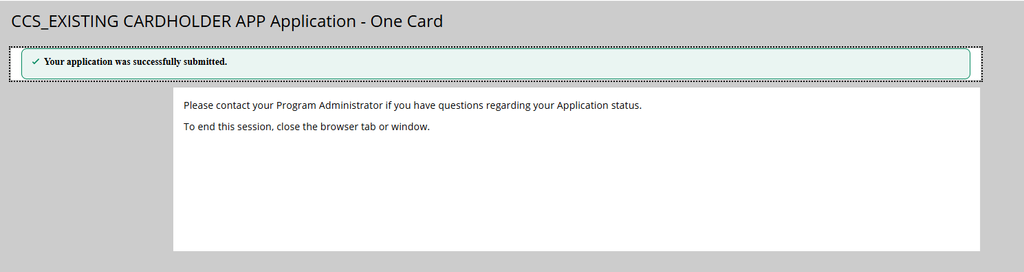
Once you check both agreement boxes, click Submit. If all required information is complete, a green box will appear confirming ‘Your application was successfully submitted.
Success
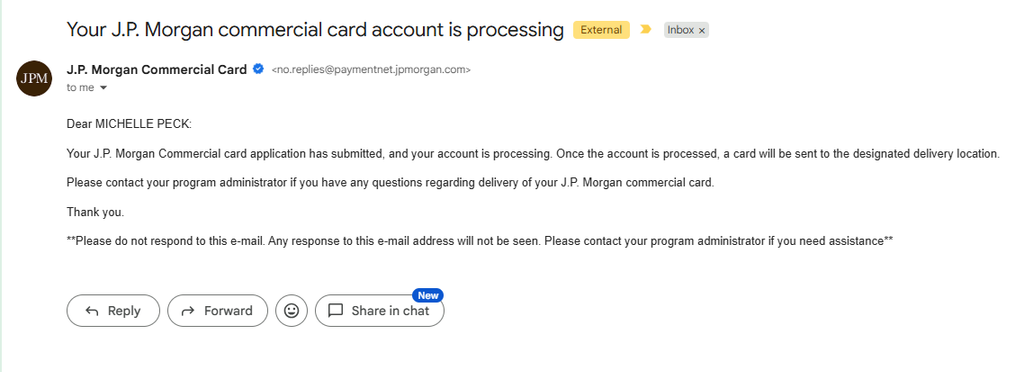
Please allow up to 2 business days for processing. Once approved, you will receive an email confirming that your card has been ordered and is on its way to the Business Office.
Questions?
Any questions regarding your corporate credit application should be directed to the Business Office at 313-664-7435 or email at busserv@ccsdetroit.edu.
A purchase order (PO) is a formal commitment to pay for goods or services, issued to a vendor to authorize an order before payment is made. A PO must be used for all goods and services unless prior authorization has been obtained from the Office of the Vice President of Finance/CFO or the purchase is travel and entertainment-related.
Exceptions: Staples, Amazon, and Continental do not require a PO or preapproval. The Business Services department provides an online portal for ordering through Amazon or Staples. To gain access, email the Purchasing Accounting Specialist, who will set up an account.
Purchases made without the consent of the VP of Finance may not be reimbursed.
The following steps outline how to process a PO. The entire process may take up to 3 business days, so please plan accordingly.
Research the goods or services needed.
Complete a purchase requisition form in Softdocs. Enter the vendor name, address, fax number, part or item number, description of the goods or services, price, and any special shipping instructions.
The purchase requisition will route through the approval workflow and ultimately reach the Purchasing Accounting Specialist, who will process it within 24 business hours.
When the product is received, email Accounts Payable to confirm receipt and approve payment.
If you receive an invoice for items purchased via a PO, forward it to Accounts Payable via email.
Note: Invoice totals may differ from the original PO due to shipping costs or price variances. The final cost will appear on the invoice and on monthly budget reports.
Credit Application
Credit applications are available through Business Services. In some cases, a credit application may be required by a new vendor before a purchase order (PO) can be accepted.
If a new vendor requests completion of their credit application, please contact the Accounting Specialist – Purchasing and Assets in the Business Services department for assistance.
Tax Exempt
CCS is a non-profit organization and is tax-exempt. Our tax-exempt ID number and a tax-exempt letter are available from Business Services. Upon request, we can also provide a copy of the W-9 form (Request for Taxpayer Identification and Certification).
Gift Card Purchases
Gift card purchases are strongly discouraged and should be made only when absolutely necessary. According to IRS regulations, gift cards are considered cash compensation and are taxable regardless of value.
The Business Office is responsible for tracking all gift card purchases and reporting them on year-end tax forms as taxable income for the employee or vendor. This includes any CCS Bookstore gift cards.
Departments purchasing gift cards will be required to provide recipient information for tax reporting purposes.
Approved Vendors
Due to the diverse needs of the College, there are only a few required vendors: Amazon or Staples for office supplies, and Continental for catering. For all other purchases, departments may use vendors of their choice. Procurement of goods and services should meet College needs at the lowest possible cost while maintaining the quality necessary for proper departmental operations. In general, purchases should maximize value per dollar expended.
New vendor approval from the Business Services department is required before engaging a new vendor.
To submit a vendor for approval, please see our New Vendor Procedures. Important: You may not start working with a new vendor until you have received an approval confirmation email.
Office Supplies
Amazon and Staples Advantage are the College’s preferred vendors for office supplies. Staples offers pre-negotiated pricing for certain items. To order sup plies, use the online Amazon or Staples ordering portal. If your department does not yet have access, contact the Accounting Specialist – Purchasing and Assets in the Business Services department to set up an account. Orders are placed daily and are typically delivered the next business day or the following day.
Copy Paper & Envelopes
To request copy paper or CCS envelopes, please email the Accounting Specialist – Purchasing and Assets in the Business Services department. If your department’s letterhead stock is running low, orders should be placed through the CCS Imaging Center.
Business Cards
Business cards are ordered through the Human Resources Department
Coffee & Water Supplies
Coffee pods/packs, cups, sugar, tea, creamer, and other beverage supplies should be purchased using an approved departmental method and are intended for department-wide use. Water coolers are located strategically around campus. The College’s water vendor is Absopure, with deliveries made every other week. If additional water bottles are needed, please contact the Accounting Specialist – Purchasing and Assets in the Business Services department.
Catering
Continental is the College’s only authorized vendor for catering. The contract with Continental is based on the College’s commitment to exclusively use their catering services.
Flowers & Gifts for Approved Occasions
The College has established guidelines for the purchase of flowers and gifts for certain approved occasions (e.g., birth, get-well, death). All requests must be submitted to Human Resources for approval and processing on behalf of the College community. The use of departmental funds for these purposes is prohibited.
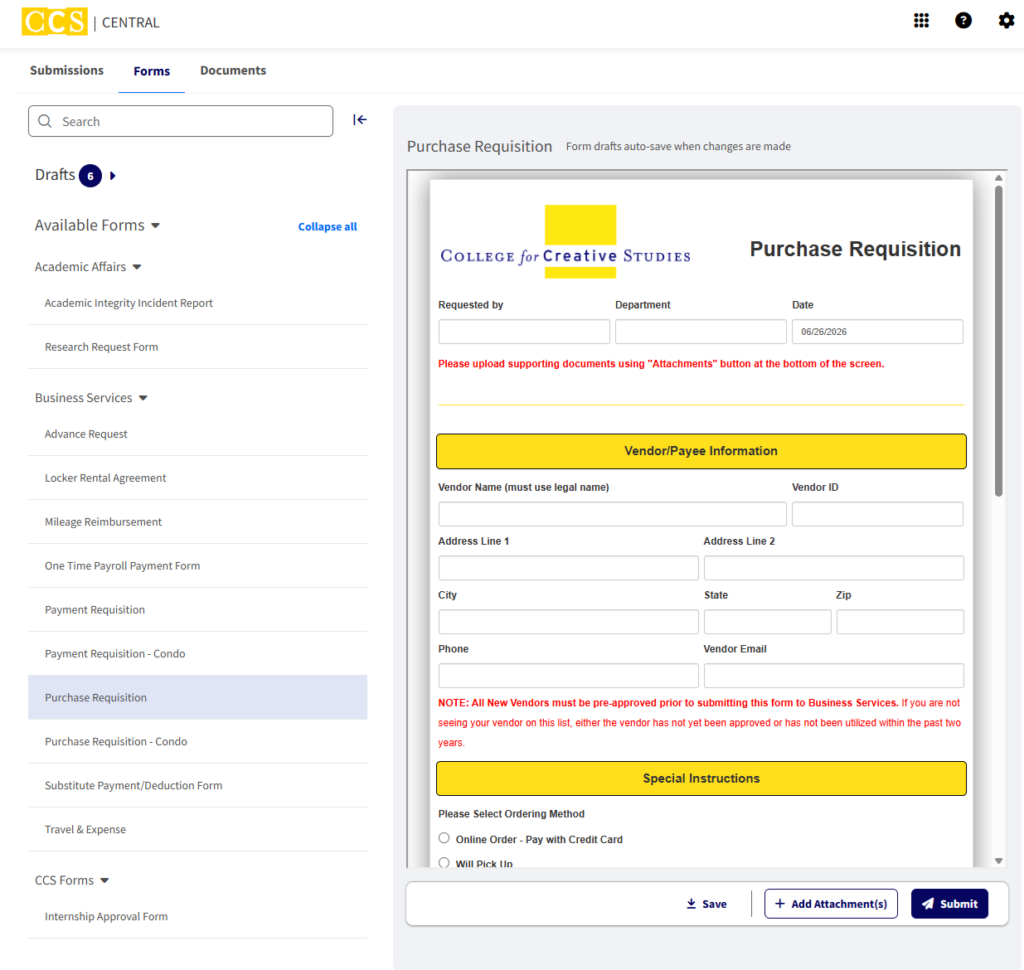
Submitting a Form via Softdocs
The Business Office uses Softdocs for all internal and external forms.
You can sign in using your CCS credentials by entering your email a ddress. If you are not already logged into Access Manager, Softdocs will prompt you to log in using your CCS username and password.
Once signed in, you will be taken to your Central Dashboard, which includes Submissions, Forms, and various Documents.
Click on Forms and use the arrows to navigate through the available forms for the Business Services Department.
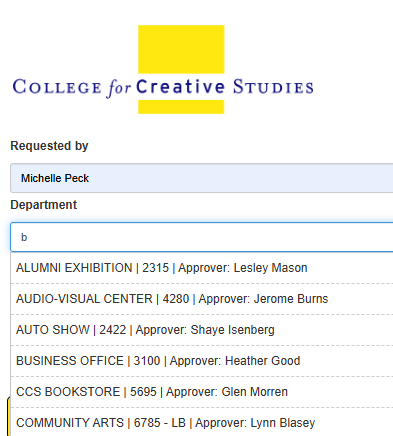
Once a form is selected, you can view and complete it directly within the dashboard. Form drafts automatically save whenever changes are made. Many fields, including Department, Vendor, and GL Account information, will auto-populate based on the information entered.
The forms are designed to calculate pricing and route requests to the appropriate authorized signers, as well as any departments that may need to approve sponsored project funding, technology requests, capital project funding, or other specialized requests.
Once a department is selected, the Authorized Signature fields at the bottom of the form will automatically populate. These fields should not need to be changed. If you notice an issue or inconsistency, please contact the Business Office at busserv@ccsdetroit.edu
If attachments are required, use the Add Attachment(s) button at the bottom of the form. When you are ready to submit your request, click Submit.
The approval workflow takes place behind the scenes and will automatically route the form to the appropriate individuals and departments for review and approval.
If you are an Authorized Signer receiving a form for approval, you will see Approve and Decline buttons at the bottom of the form. If a form is declined, it will be routed back to the originator for edits, and they will receive an email notification explaining that revisions are needed before the request can proceed. You are also able to Return or Refer the packet to another person.
Questions?
Any questions regarding purchase requisitions or checks that have been written should be directed to Purchasing at 313-664-7451 or email at purchasing@ccsdetroit.edu.
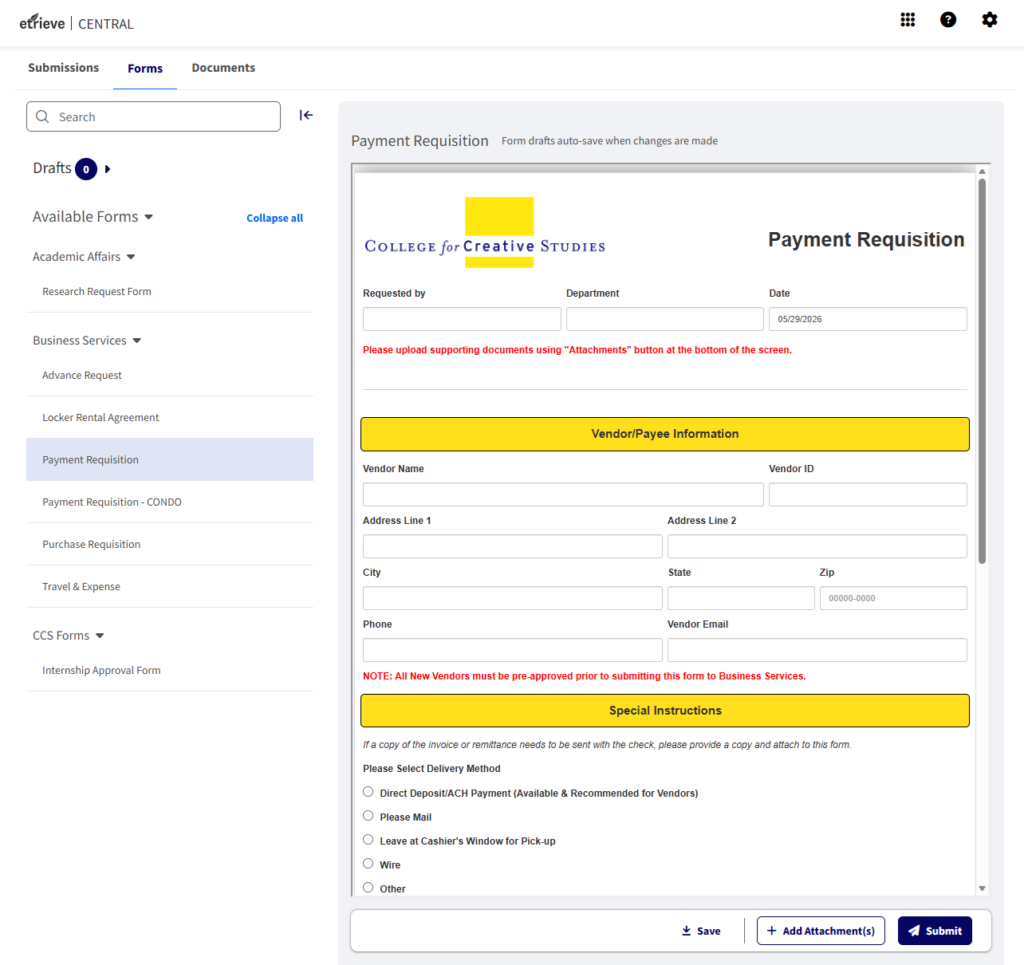
Whenever an invoice is received or a check needs to be issued, complete a Payment Requisition Form via Softdocs. Do not use this form if a purchase order (PO) has already been completed.
Complete the Payment Requisition Form. Include the vendor name and address, invoice date and number, description of goods or services, and any special instructions. If paying an individual, include their legal name.
Attach any required backup documentation (invoices) to the form in Softdocs.
The form will route through the approval workflow and ultimately reach Accounts Payable for processing in the next scheduled check run.
Weekly Check Run
The Accounts Payable check run is typically conducted on Wednesdays. To ensure a payment requisition is included in the week’s check run, all requisitions must be fully approved in Softdocs by Tuesday at noon, so please plan accordingly.
Paper checks will be available for pick-up on Friday at the Cashier’s Window; unless otherwise noted, checks will be mailed. If a check is picked up to deliver to a vendor, it must be delivered within one week of issuance, as holding checks is not permitted.
Submitting a Form via Softdocs
By submitting a payment requisition, you (or the department) is authorizing the payment. The Business Office uses Softdocs for all internal and external forms.
You can sign in using your CCS credentials by entering your email a ddress. If you are not already logged into Access Manager, Softdocs will prompt you to log in using your CCS username and password.
Once signed in, you will be taken to your Central Dashboard, which includes Submissions, Forms, and various Documents.
Click on Forms and use the arrows to navigate through the available forms for the Business Services Department.
Once a form is selected, you can view and complete it directly within the dashboard. Form drafts automatically save whenever changes are made. Many fields, including Department, Vendor, and GL Account information, will auto-populate based on the information entered.
The forms are designed to calculate pricing and route requests to the appropriate authorized signers, as well as any departments that may need to approve sponsored project funding, technology requests, capital project funding, or other specialized requests.
Once a department is selected, the Authorized Signature fields at the bottom of the form will automatically populate. These fields should not need to be changed. If you notice an issue or inconsistency, please contact the Business Office at busserv@ccsdetroit.edu
If attachments are required, use the Add Attachment(s) button at the bottom of the form. When you are ready to submit your request, click Submit.
The approval workflow takes place behind the scenes and will automatically route the form to the appropriate individuals and departments for review and approval.
If you are an Authorized Signer receiving a form for approval, you will see Approve and Decline buttons at the bottom of the form. If a form is declined, it will be routed back to the originator for edits, and they will receive an email notification explaining that revisions are needed before the request can proceed. You are also able to Return or Refer the packet to another person.
Manual Checks
In emergency situations, a manual check may be processed if the appropriate staff are available to prepare and sign the check. However, in most cases, planning ahead can prevent the need for this process.
1099 Tax Forms
A 1099 tax form may be issued to any individual who provides a service to the College and whose payment is not processed through payroll. The Business Services department collects all necessary information to generate the 1099 during the New Vendor Process.
Received Goods & Services
If goods or services were ordered using a purchase order (PO), notify Accounts Payable once the items have been received. To do so, email acctspayable@ccsdetroit.edu, indicating that the item(s) have arrived on campus and providing the delivery date, which is required for accurate year-end reporting. If an invoice was received from the vendor along with the items, please forward it to Accounts Payable as well.
Questions?
Any questions regarding payment requisitions or checks that have been written should be directed to Accounts Payable at 313-664-7436 or email at acctspayable@ccsdetroit.edu.
Whenever an invoice is received or a check needs to be issued, complete a Payment Requisition Form via Softdocs. Do not use this form if a purchase order (PO) has already been completed.
Complete the Payment Requisition Form. Include the vendor name and address, invoice date and number, description of goods or services, and any special instructions. If paying an individual, include their legal name.
Attach any required backup documentation (invoices) to the form in Softdocs.
The form will route through the approval workflow and ultimately reach Accounts Payable for processing in the next scheduled check run.
Travel & Expense Form
Please refer to the Travel and Entertainment Policy for all rules and guidelines. CCS recognizes that the effective conduct of the College’s activities will require employees to travel from time to time on behalf of CCS. It is therefore the policy of the College to reimburse employees for all expenses that are necessary, and incurred, when traveling on authorized College business.
For reimbursements under $60, petty cash may be provided at the Cashier’s Window.
If you are an Authorized Signer for your department,you may not approve your own travel & expense report.
For meal reimbursements, an itemized receipt is required. If an itemized receipt is not submitted, the meal will not be reimbursed. Credit card authorization slips are not acceptable as documentation for meals.
Mileage Reimbursement
The current mileage reimbursement rate is posted on the Business Services Campus page. This rate is based on IRS publications and will change each January. CCS reimburses based on mileage, not on gas receipts. For reimbursements under $60, petty cash may be provided at the Cashier’s Window. Mileage will not be reimbursed for trips where the College shuttle is available.
To request reimbursement, complete a Mileage Reimbursement Form via Softdocs. CCS reimburses employees only for mileage that exceeds their normal commute. The reimbursable distance is calculated by taking the total miles driven and subtracting the miles to the employee’s usual work destination (e.g., Home, Taubman Center, Ford Campus). The Softdocs form guides employees through this calculation for each trip.
Travel Advance
Employees may request a travel advance for business-related trips by completing an Advance Request Form approximately two weeks prior to the planned travel. Advances may cover the cost of meals, lodging, transportation, mileage, tips, parking, conference fees, and other related expenses. Faculty professional development funds must be requested in advance and approved by the Academic Affairs Office.
Upon returning to campus, a Travel & Expense (T&E) Reimbursement Formmust be submitted via Softdocs within 10 business days, detailing how the advance was spent. The form will be reviewed and approved by the employee’s supervisor. Any unspent advance must be returned immediately to the Cashier’s Office upon completion of the Travel & Expense form. If additional funds are due to the employee, a check will be processed through Accounts Payable.
All receipts for petty cash purchases must be returned to the Coordinator, and receipts for check-issued travel advances must be submitted to Accounts Payable. Returned funds may be paid by cash, check, or credit card (note: a fee applies if using a credit card).
All New Vendors must be preapproved through our office before you are permitted to work with them. Here is a quick timeline of what should happen during the New Vendor Process:
Ask the vendor you are wanting to work with to submit a W9 or W8 (If Vendor is not a US Citizen) and an ACH Authorization Form. This is the responsibility of the department who is working with the vendor. Business Services will not request this information from the vendors directly. Please note: You should send the W9 and/or the ACH Authorization Form directly to your vendor to complete.
Once Business Services has received the NVF, W9 and ACH forms, we will be able to review the information and come to a decision. Please plan ahead by at least 2 weeks to allow ample time for processing.
You will receive an email from Olivia Andre or Heather Good stating you are approved/not approved to use the vendor. If they are not approved, we will give you any information we can on why. However, sometimes the reasoning is something we will be unable to share (IRS isn’t able to confirm the information on the W9, legal reasons, etc).
You can then start working with the Vendor if you received approval from us and you can also then submit the Purchase/Payment requisition to our office.
We have also created a new ACH Change Form for Vendors to complete if they have new banking information to share.
**If any of the steps above are not followed in order, it will delay the process of approving your vendor. Please be sure to follow the steps as outlined above.**
Please remember we are no longer able to provide a link to these forms on our office page. Contact busserv@ccsdetroit.edu for access to the NVF, W9, and ACH forms.
Visa credit cards are available and provided to employees for the purpose of charging legitimate travel and entertainment expenses to the College. Cardholders should not use corporate credit cards to circumvent the Colleges purchasing function by charging for other than approved travel-related expenses unless previously approved by the VP of Finance/CFO.
Authorization to obtain a card must be through the VP of Finance/CFO. Although the card is issued in an individual’s name, it should be considered College property.
Complete details and more information may be obtained through the Business Services department.
Credit Card Expense Report Procedure
Once a month, Business Services receives an invoice from J.P. Morgan for payment. The cardholder will then submit an electronic expense report monthly via the website https://www.next.jpmorgan.com/.
Your monthly report is due to our office by the 5th business day of each month. This ensures us proper time to look them over and process them.
If transactions are not completed by the due date, the cardholder will be notified of missing documentation, and card privileges may be suspended until the proper paperwork is submitted.
Amazon and Staples Advantage are the College’s preferred vendors for office supplies. Staples offers pre-negotiated pricing for certain items. To order supplies, use the online Amazon or Staples ordering portal. If your department has not been given access, please contact Accounting Specialist – Purchasing and Assets in the Business Services department to set up an account. Orders are placed daily and are typically delivered the next business day or following day.
Copy Paper and Envelopes
To request copy paper and CCS envelopes, please email the Accounting Specialist – Purchasing and Assets in the Business Services department. If your department’s letterhead stock is running low, orders should be placed through the CCS Imaging Center.
Business Cards
Business cards are ordered through the Human Resources Department.
Coffee and Water Supplies
Coffee pods/packs, cups, sugar, tea, creamer, and other beverage supplies should be purchased using an approved departmental method and are intended for department-wide use.
Water coolers are located strategically around campus. The College’s water vendor is Absopure, with deliveries made every other week. If additional water bottles are needed, please contact the Accounting Specialist – Purchasing and Assets in the Business Services department.
If a college owned asset becomes unusable and needs to be disposed please contact Business Services in writing with a description of the asset, the property tag number, and the reason for the disposal. The Business Services department must properly account for the disposal and remove the asset from our inventory system. If you have the physical tag, please send it to the Business Services Department.
Selling A College Owned Asset
Departments must obtain approval from the VP of Finance/CFO before selling any capital asset and notify the Business Services department. A detailed record of all assets sold must be maintained, including, the property tag number, serial number, description of the asset, sale amount, and name of the purchaser. Departments may not sell college-owned assets without permission.
Reporting A Stolen College Owned Asset
If you become aware of any college-owned asset that has been stolen or is noticed to be missing you must notify Campus Safety. A copy of the incident report will be provided to Business Services so that the asset can properly be accounted for and removed from our inventory system. Remember, the College has a fraud hotline (call 313.664.7998) that may be used to report stolen property while remaining anonymous.