Welcome to using Zoom at the College for Creative Studies. Zoom is a web-based system that combines video conferencing, online meetings, and mobile collaboration into one platform. When you sign up for Zoom, you will automatically be given a Basic Account. With the Basic Account, you can hold meetings with three or more participants for up to 40 minutes at a time. If your meeting has two participants (host and one additional participant), your call time is unlimited. If your meeting has three or more participants and will take longer than 40 minutes, please contact the Helpdesk with your request for a temporary upgrade to a Licensed Account. This guide will walk you through how to set up your account, schedule a meeting, and manage your audio and video.
Accessing Your Account Profile
- Sign in to the CCS Access Manager.
- Click on the Zoom button.
- Click on the Login link at the top right corner of the screen, and sign in with your login credentials.
- Click on the Profile menu option on the left side of your screen. Your account information is displayed here. Take a moment to upload a profile picture and make any edits you see fit.
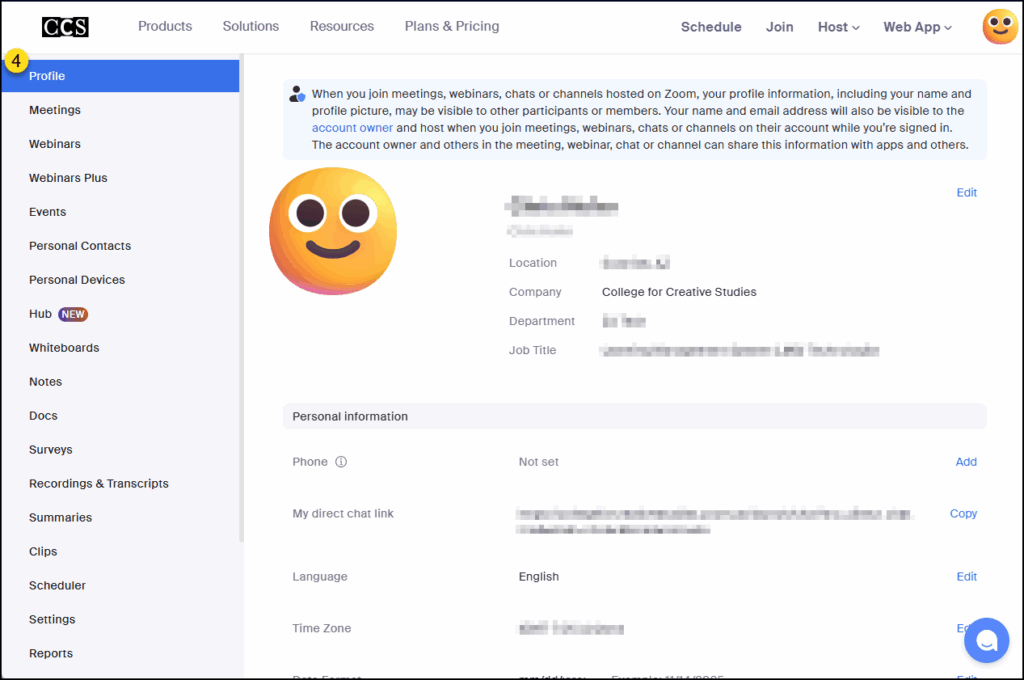
During Zoom meetings, your profile picture will display on screen when you pause your live video.
Schedule a Meeting/Class
- Sign in to the CCS Access Manager.
- Click on the Zoom button.
- Click on the Login link at the top right corner of the screen, and sign in with your login credentials.
- Click on the Schedule link or the + Schedule a Meeting button on the upper right corner of the screen.
- Add the meeting details, including (but not limited to):
- Topic for your meeting
- Set the date and time for When your meeting will be held
- Duration of your meeting
- If your meeting needs to be more secure, select the Passcode checkbox, and add a custom passcode.
- Enable Waiting Room (recommended).
- Not shown in the below screenshot:
- Host and Participant Video set to On (recommended)
- Audio set to Both
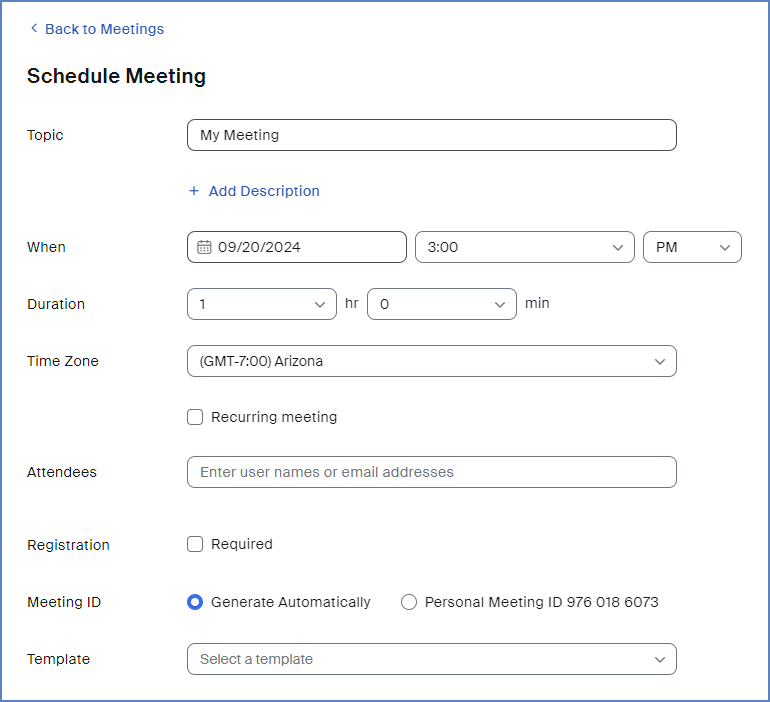
- Click the Save button at the bottom of the screen.
A detailed summary of your meeting will display on the screen which includes the Zoom URL and a Copy Invitation button which you can use to copy/paste the invitation to your Zoom attendees.
Host a Meeting/Class
- Sign in to the CCS Access Manager.
- Click on the Zoom button.
- Click on the Login link at the top right corner of the screen, and sign in with your login credentials.
- Click on Meetings menu option on the left-hand side of the screen.
- Ensure you are on the Upcoming tab.
- Hover over an upcoming meeting that you want to start, and click the Start button.
- A new pop-up window may display on your screen. Click on the Open Zoom Meetings button.
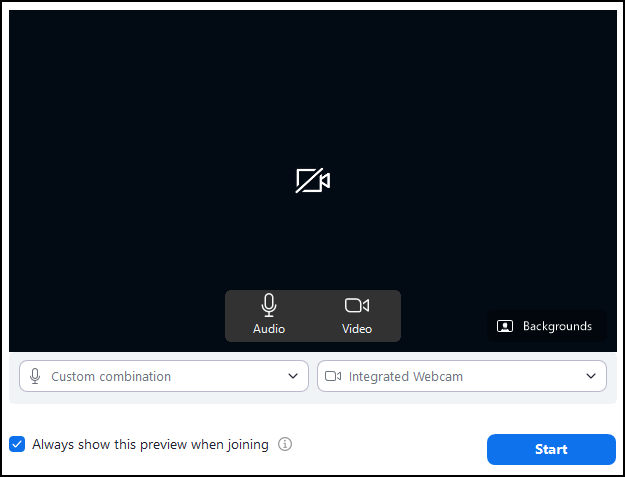
A window may appear displaying the name of your meeting along with audio and video options. These include:
- Audio and Video buttons to enable/disable these options.
- A Backgrounds link to select a background during your Zoom session.
- Custom combination (audio options) and Integrated Webcam (video options) drop-down lists to select your audio and video sources.
- A checkbox for Always show this preview when joining.
- A button to Start the Zoom meeting.
Managing Audio
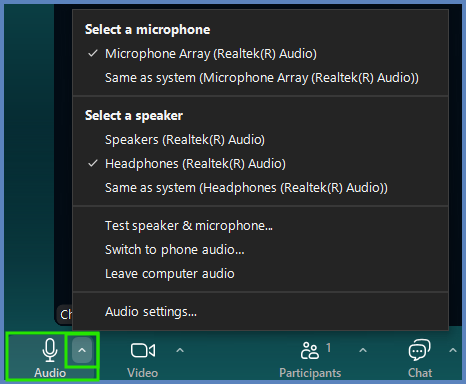
When in your Zoom meeting, on the bottom left corner of the control bar you will see an🎙️Audio icon. Mute and unmute your microphone by clicking the icon. You may also click the caret icon to the right of the🎙️Audio icon to see more audio preferences.
NOTE: Your microphone and speaker options may not look exactly like those pictured below.
Managing Video
Your webcam should connect automatically if you selected video to On for the start of the meeting when you created the meeting invitation.
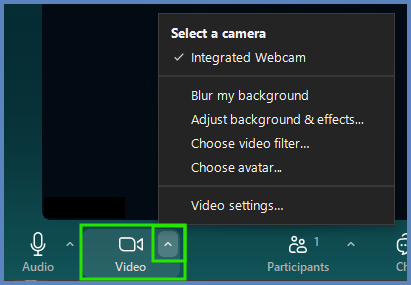
You will see a 🎥Video icon next to the🎙️Audio icon in the bottom control bar. You can enable/disable your video by clicking on the icon. You may also click the caret icon to the right of the 🎥 Video icon to see more video preferences.
NOTE: Your video options may not look exactly like those pictured below.
Managing Participants
Remote participants will enter a Waiting Room to wait to be admitted to your meeting. The Waiting Room has CCS branding and a message that the meeting will begin shortly. The Waiting Room feature allows you to admit participants to your meeting when you are ready. If you have back-to-back meetings scheduled, the Waiting Room also keeps participants from joining in the middle of a meeting in progress. As the host, you will receive an audio notification (ding) and the name of the participant when someone has entered the Waiting Room.
To admit someone from the Waiting Room into the meeting, select the Participants button from the bottom of the window.

This will open a new pane on the right side of the Zoom window labeled Participants from which you can admit attendees in the Waiting Room to the meeting proper.
Sharing the Screen
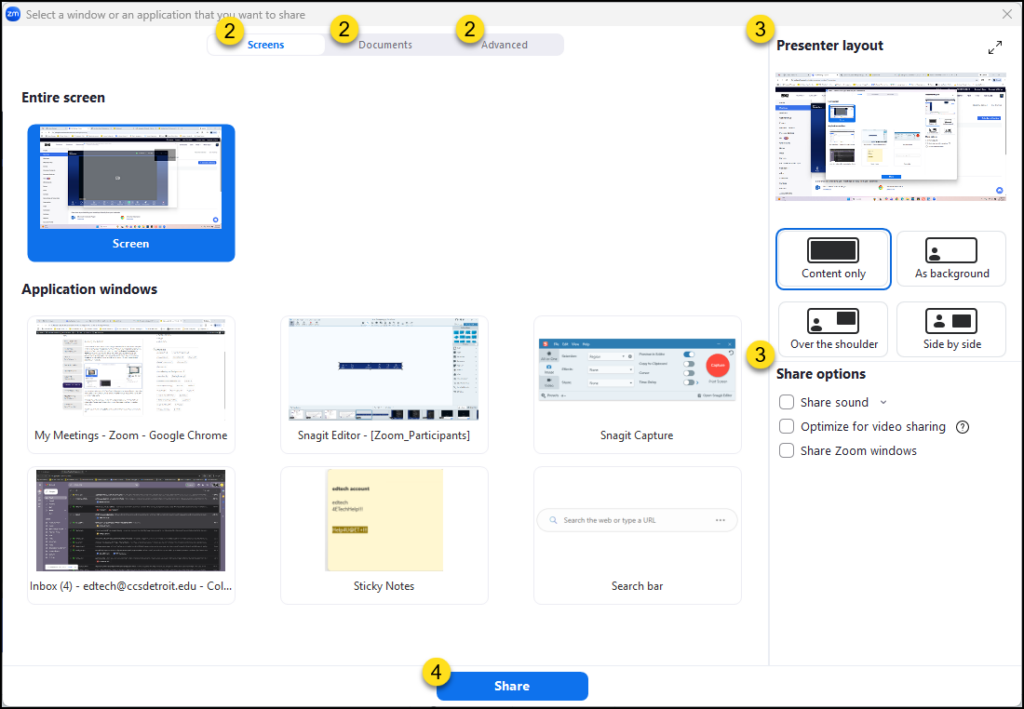
- Click the Share icon in the control bar.
- Select the content you want to show from the Screens, Documents, or Advanced tabs.
- (Optional) Adjust the Presenter layout and Share options on the right.
- Click Share to begin.
The control bar will remain at the top of your desktop while you are sharing your screen. You can choose to share something new by clicking the Share icon, or stop sharing your screen by selecting Stop share.
When you choose to share your screen, there is also an option to use a Whiteboard for collaboration. To save your Whiteboard in a screen shot, select Save in the annotation control bar.
This will save in a folder titled Zoom in your documents folder on your hard drive as a png file.
Using Annotations
How to Use Annotation Tools
- Start Sharing: While sharing your screen, move your cursor to the control bar at the top of the screen.
- Open Tools: Select the Annotate icon to open the toolbar.
- Create: Use the available options to draw, add text, or spotlight your cursor on the content.

Managing Your Annotations
- To Clear: Select Clear in the annotation control bar to erase your drawings.
- To Save: Select Save in the annotation control bar to capt
- Note: These files are saved in your Documents > Zoom folder.
- File Naming: Files are named by “Year-Month-Date-Time” (e.g., 2023-10-25-0930) to make them easy to locate.
Additional Permissions
- Host Privileges: You can upgrade an attendee to host status to grant them different annotation abilities.
- Support: For more information on privileges, please contact Academic Technologies at 313-664-1501.
Recording the Meeting/Class
You also have the option to record your meeting. Once your meeting has started, click the Record icon in your control bar to begin recording.

The meeting will record a *.mp4 file every time the record option is started and stopped. The file will save to a folder titled Zoom in the documents folder on your computer.
Ending the Meeting/Class
When you are ready to end your meeting, click the End icon on the bottom right corner of the Zoom interface. Then, select End meeting for all.
For Basic users, keep in mind that your meeting will be limited to 40 minutes. A 10 minute countdown warning will pop up after 30 minutes. If you require your meeting to last longer than 40 minutes, please contact Information Technology Services.