How to Update your Default Budget
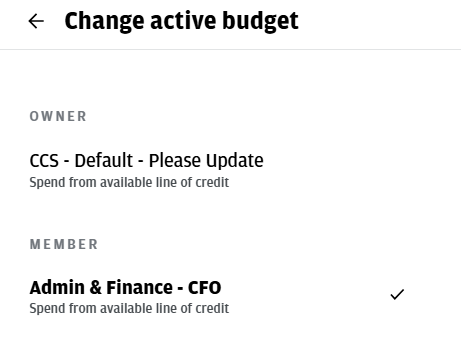
You will first need to select a Budget. J.P. Morgan does not allow us to change this field name, but in this system, Budget refers to your divisional group. This selection determines how your transaction is routed to the appropriate leadership person for approval.
Most cardholders will see two options. By default, everyone is assigned to CCS – Default – Please Update. If you do not update your default to the correct division, you will need to manually select the appropriate divisional group for each transaction.
Step 1: SELECT ‘CARDS’
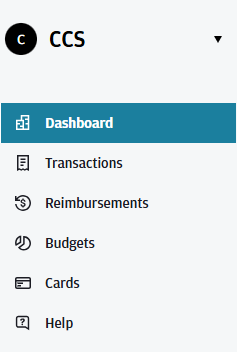
Once logged in, select the Cards menu. From there, you will see all cards associated with your wallet. Select the card you’d like to update the default budget for.
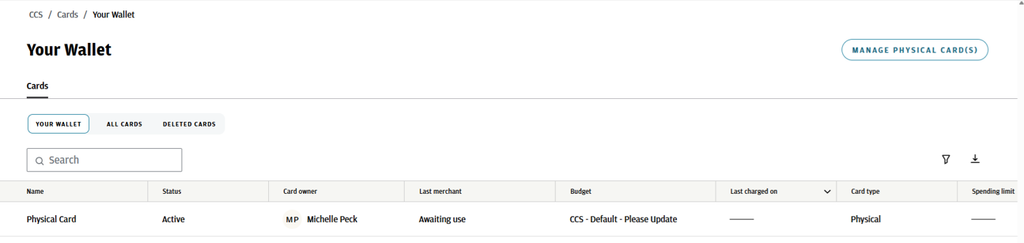
Step 2: CHANGE BUDGET
Every cardholder is initially assigned to the “CCS – Default – Please Update” budget/division.
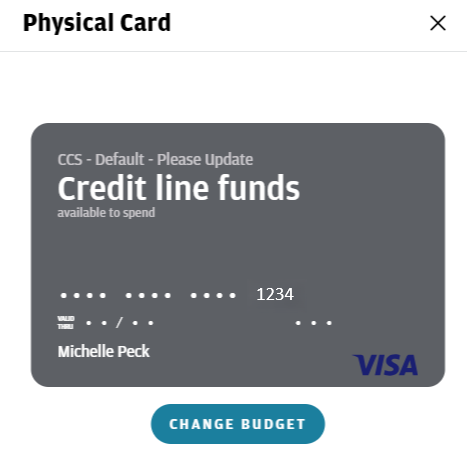
A preview menu will pop open with an image of the physical card . Click the Change Budget button.
To update this to your correct division, select the appropriate budget/division under the Member heading. This is important because it ensures your expenses are routed to the correct leadership person for approval.
There is no Save button. Simply click the back arrow to save your changes. Once updated, your card preview will display your newly selected Member budget/division.
Support and Training
We want to make this transition as smooth as possible for everyone. Here is how you can get help:
1:1 Training: You can schedule a personalized session by reaching out to any member of the Business Services team by emailing us at busserv@ccsdetroit.edu